Design case
Independent AI product concept · 2026
An assistant that shows its working, and knows when to stop.
Over To You drafts a project handover from the files an agency or freelancer already has: brief, emails, meeting notes, invoices, design exports, a changelog, a contract. The interesting part is not the writing. It is everything around the writing: where each sentence came from, how sure it is, what happens when the files disagree, and who gets the final say.
- My role
- Product design, interaction design, writing and front end
- The brief
- Self-set, no client
- What you can try
- A working demo over a fictional project of nine files
- Under the hood
- A scripted, deterministic engine. No language model.
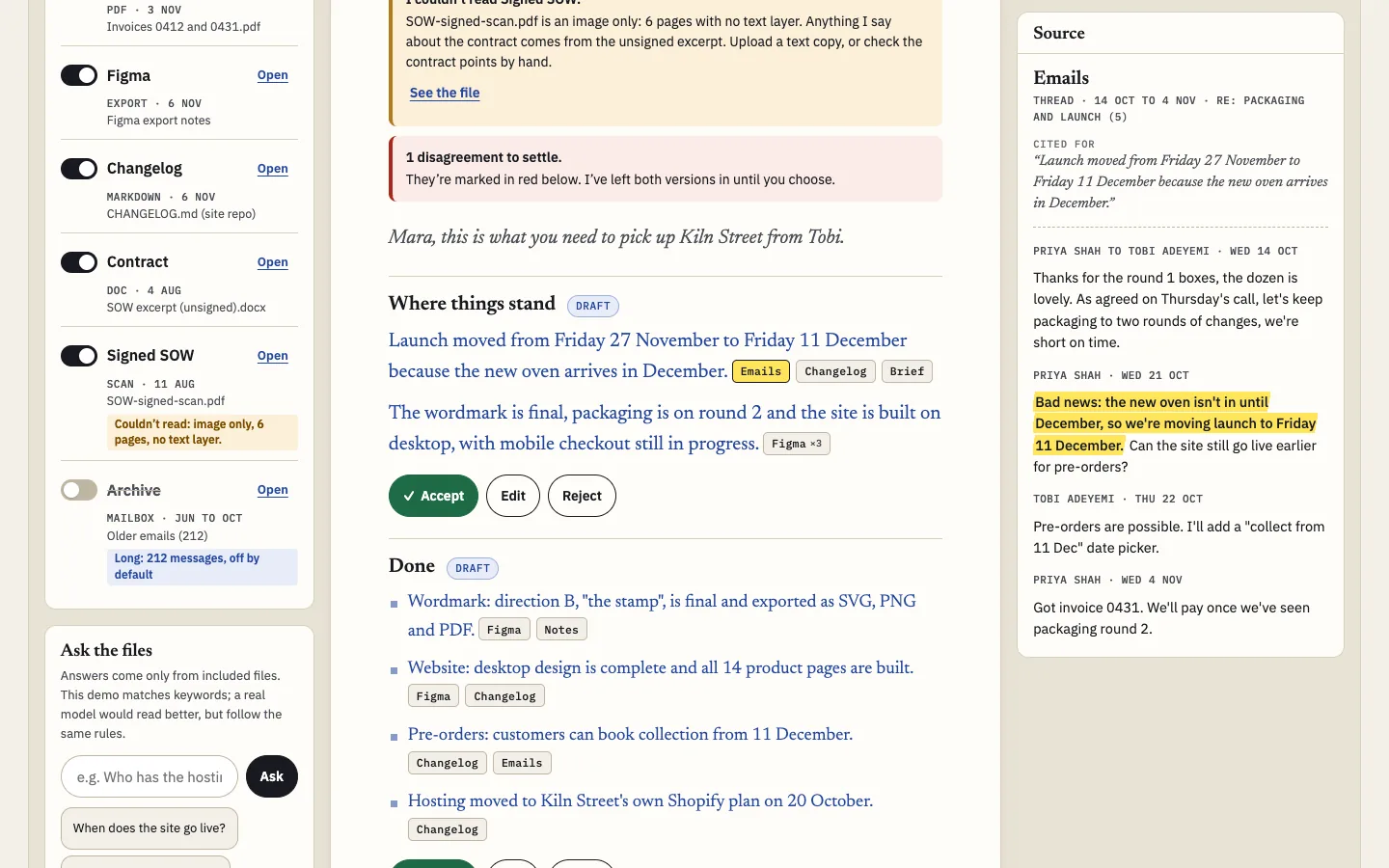
Be clear about what this is. The demo is scripted. Every sentence it can write is authored in advance and tied to passages in the seeded files; the engine chooses which sentences survive based on which files you include, your audience and your settlements. The step timings are paced for legibility, and “Ask the files” matches keywords. What the demo proves is the interface for an AI product, not the model behind one.
01
The problem
Handovers get written at the worst moment, by the person with the least time left.
Someone is leaving, a project is changing hands or a client wants a status update before signing off. The facts exist, but they are spread across a dozen formats, and some of them contradict each other. Writing it up is tedious, so it gets skipped or skimmed.
That makes it look like a perfect job for AI summarising, and that is exactly the danger. A fluent summary that quietly picks the wrong revision count, invents a login or misses an unpaid invoice is worse than no summary, because the next person trusts it. So the design question was never “can it write a handover?” It was: how does someone know which sentences to trust, and stay in charge of what gets sent?
This is a framing from working with agencies and freelancers, not a research finding. It is the hypothesis the concept is built to test.
02
Who it’s for
One writer, three very different readers. The same project needs a different report for each, which is why “Who is it for?” sits at the top of the tool rather than in a settings menu.
The client
Wants status, money and what is needed from them. Doesn’t need the font licence problem or the repo history.
The studio
Wants everything, including risks and money, to decide what to chase.
The next designer
Wants decisions, open work, watch-outs and where the files live. Doesn’t need the invoices, so they are left out, and the report says so.
03
Desk research: the guidance I designed against
Rather than invent principles, I worked from public guidance on human and AI interaction and turned each into a concrete behaviour you can try.
| Guidance | What it says, in short | What it became here |
|---|---|---|
| Microsoft HAX, guidelines 1 and 2 | Make clear what the system can do, and how well. | The intro says what it reads and that it only writes from your files. Confidence shows per sentence, not as a global score. |
| HAX 9 and 8 | Support efficient correction and dismissal. | Accept, Edit and Reject on every section. Rejected sections leave the export but can be restored. |
| HAX 10 | Scope services when in doubt. | Disagreements are never resolved for you. Unreadable files are named, not guessed at. |
| HAX 11 | Make clear why the system did what it did. | Every claim has source chips that open the exact passage. Visible steps report real counts. |
| HAX 16 and 18 | Convey the consequences of actions; notify users about changes. | Switching a file off says how many sentences changed. Accepted sections that change reopen with the reason. |
| PAIR Guidebook: Explainability and Trust | Calibrate trust: not too much, not too little. Explain in terms of the user’s decision. | Three confidence levels tied to an action (repeat it, check it, settle it), not a probability. |
| PAIR: Errors and Graceful Failure | Plan for errors as part of the experience and give a path forward. | A designed state for each failure in the inventory below, each with a next step. |
| PAIR: Feedback and Control | Let people stay in control and correct the system. | Include or exclude any file, change audience and tone, edit any sentence, undo any step. |
| Apple HIG: Generative AI | Keep people in control, be transparent about AI involvement, design for mistakes. | Blue pencil marks the assistant’s words until a person accepts them. There is no send button at all. |
| Nielsen Norman Group on AI hallucinations | Users struggle to spot confident, wrong output; design should help verification. | Verification is one hover away, and the cited passage is highlighted in context rather than paraphrased. |
04
Options I considered and rejected
- A chat box as the main surface. A handover is a document that has to be complete, not a conversation you have to know the right questions for. Chat survives as “Ask the files”, a side tool for gaps.
- A confidence percentage per sentence. “87%” invites false precision, and readers can’t act on it. See chapter 06.
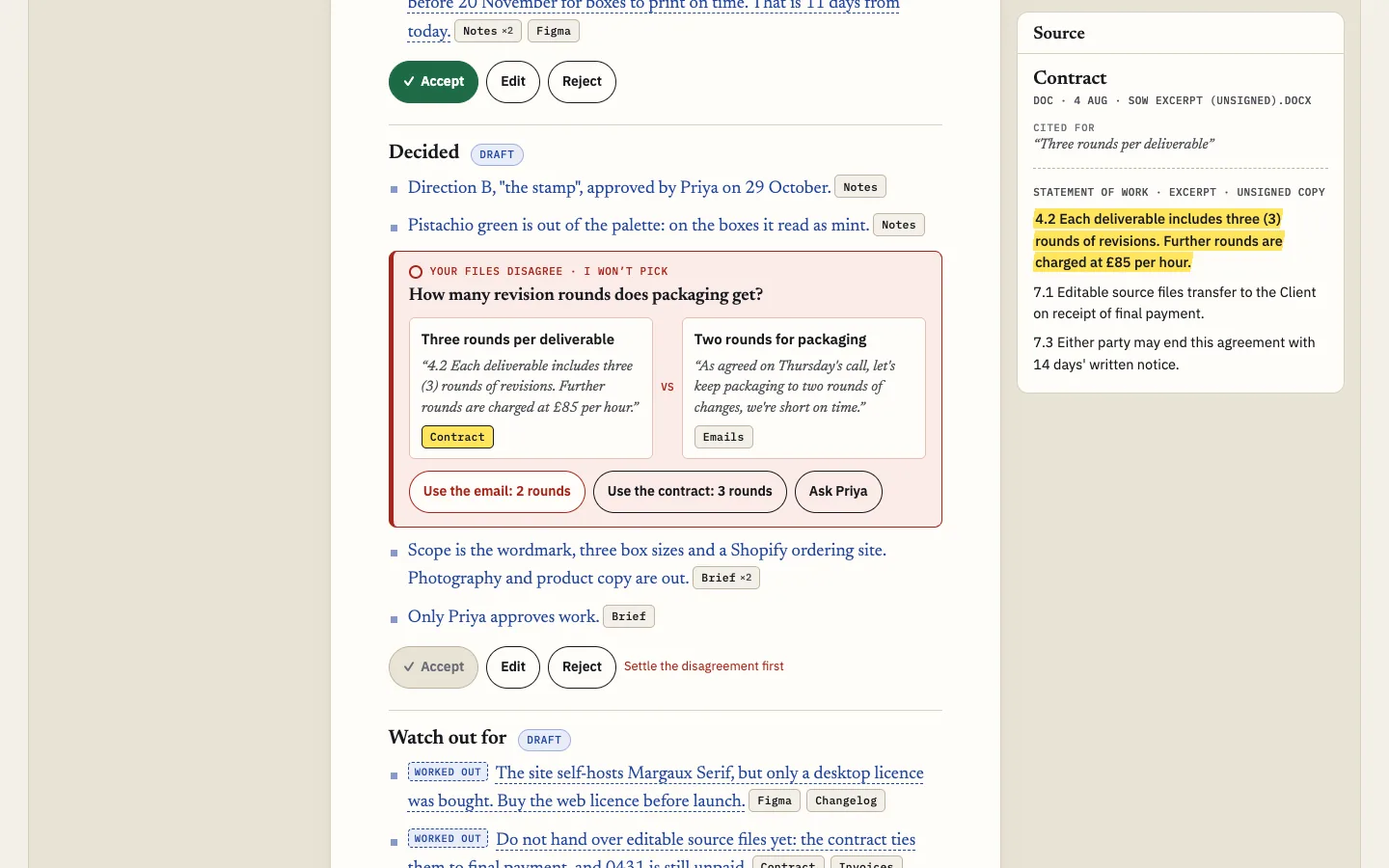
- Resolving conflicts by recency. Newest wins is right for the launch date (the email explicitly moves it) and wrong for revision rounds (an email doesn’t override a contract). The tool can’t know the difference, so it doesn’t pretend to: date changes are noted with both sources, contradictions go to the human.
- Footnote numbers instead of named chips. Numbers are tidy but force a trip to the bottom. Named chips (“Emails”, “Contract”) tell you the kind of evidence before you look.
- Auto-sending on a schedule. Sending is the one action with consequences outside the tool. It stays a copyable draft.
05
Key decisions
Blue pencil, black ink
The assistant writes in blue, the editor’s pencil. A section turns black only when a person accepts or edits it. At a glance you can see how much of the document is still the machine’s.
The chips are the confidence
One chip per file. Two chips means two files agree; one chip means one file says so. No extra icon is needed for the common case, which keeps the page calm.
Disagreements block
A section with an unsettled conflict can’t be accepted. You can still send, but the conflict goes out as a question, never as a silent pick.
Accepted is not forever
If you switch a file off after accepting, sections whose words change reopen in amber with the reason. Approval is of content, not of a slot on the page.
Steps that report, not perform
The visible steps state real counts: files read, dates found, disagreements flagged. No spinning “thinking” copy. In a real product they would also be real timings.
Stopping is honest
Stop leaves finished sections intact and strikes through the half-written sentence, so a fragment can’t pass for a finished claim. Continue or discard.
06
Calibrating confidence without percentages
The reader’s real question is “can I repeat this to a client?”, not “how likely is this token?”
Model probabilities are not calibrated to that question, and a number like 87% reads as more precise than it is. So confidence is expressed as the evidence behind each sentence, in three levels that each map to an action:
Files agree. Repeat it.
One file says so. Fine for most things; check it if it matters.
Inferred. No file says it outright, so it is dashed and labelled. Check it.
Contradiction. Not a confidence level at all: a decision for you.
“Sparingly” was a deliberate constraint. Only the exceptions are decorated: inferred sentences, caveats and conflicts. If every sentence wore a badge, people would stop reading the badges. The legend is collapsed by default and the chips explain themselves on hover.
A known limit: counting files rewards repetition. Two files that both copy the same wrong date look “corroborated”. A production version would track where a fact first appeared and count independent origins, not files.
07
Failure-mode inventory
Every row is a designed state in the demo, not a note for later.
| What goes wrong | What you see | Try it |
|---|---|---|
| A file can’t be read | Named at the top of the report, in the file list and in the steps. Claims that depend on it carry a caveat. Nothing is guessed. | The signed contract scan |
| The answer isn’t in the files | “Not in your files”, where it looked, and who might know, with a source for that suggestion. | Ask for the Shopify login |
| Files contradict each other | Both passages side by side, three ways to settle it, and the section locked until you do. | Revision rounds, invoice amount |
| A fact has been superseded | The newer date is used and the old one is noted, with both cited. | Launch date |
| You remove a source | Dependent sentences fall back to what the remaining files can support, or drop, and the footer lists what was dropped and why. | Switch off Emails |
| The project is too long | A coverage note: what it read, what it left out by category, with examples. | Switch on Archive |
| You stop it mid-draft | Finished sections stay; the half sentence is struck; continue or discard. | Press Stop |
| No files at all | Drafting is disabled with the reason, and an existing draft explains why it emptied. | Switch everything off |
| You edit a cited sentence | Your words go out as yours; the chips stay with a prompt to check they still back it. | Edit any section |
| Settings change after review | A confirmation first, then changed sections reopen. | Accept, then change audience |
| A recipient is unknown | The draft says the address isn’t in your files instead of inventing one. | Next designer, then Prepare to send |
| Sending with loose ends | A checklist of what’s unsettled before the draft appears. Nothing ever sends. | Prepare to send |
| You change your mind | A full history; undo one step or go back to any point. Ctrl or Cmd plus Z works too. | History panel |
08
Accessibility
- Every chip is a real button. Focus opens the passage just as hover does, and on touch it opens a sheet that returns focus to the chip on close.
- Confidence is never colour alone: screen readers hear “Two or more files agree”, inferred claims carry a visible “Worked out” label as well as the dashed line.
- Streaming text sits in a busy region; screen readers get one announcement when drafting starts and one when it finishes, not every word.
- File switches are native checkboxes with a switch role; audience is a native radio group; dialogs are native and trap focus.
- Touch targets are at least 44px, chips included through an enlarged hit area. Colours meet WCAG AA on the paper background.
- With reduced motion, the draft appears without typing, and pulses and slides are switched off.
09
What I would measure
Nothing here has been measured: it is a concept. These are the signals I would instrument, and what each would tell me.
| Signal | Why it matters |
|---|---|
| Accept rate per section, by audience | Which sections the assistant is good at. Low accept on “Watch out for” would point at weak inference. |
| Edit distance between draft and sent text | How much rewriting people do. High edit distance with high accept means the facts are right but the voice is wrong. |
| Conflicts caught, and how they were settled | Settled versus sent as questions shows whether people can decide in the moment, and which contradictions are common. |
| Chip opens per accepted section | The over-trust check. Very fast accepts with no chips opened would be a warning sign, not a success. |
| “Not in your files” rate on Ask | What people expect a handover to contain that their files don’t: a product roadmap in itself. |
| Corrections after handover | Issues the next reader raises in the following two weeks that the report missed or got wrong. The real quality bar. |
10
What I would test next
- With real files. Five agency producers or freelancers, each with a project they recently handed over, comparing what the tool drafts with what they actually sent.
- A planted error. Seed one wrong but plausible sentence with a single chip, and see who catches it. That tells me whether the chips are being used or merely seen.
- Blue to black. Whether the colour shift is understood without the legend, or needs a word on first use.
- Conflict fatigue. On a messy project with fifteen contradictions, does blocking acceptance help or make people give up? A batch “send all as questions” might be needed.
The name: the working title was Handover, but an agency client-delivery product already trades under it, so this became Over To You, which is also what the tool says when it hands the decision back.